day -9: playset

The kids love their new backyard playset. What a change from the last few places we’ve lived… a whole real backyard with a brand new playset in it. Perfect for getting out energy and jumping about… now all we need is something better than wood chips underneath it. Amelia is such a ham lately, grinning up a storm or making goofy faces whenever I bring out the camera. She always follows her face with an “I wanna see the picture!”

day -9: playset

Crop frame cameras – why your field of view may not equal your focal length

Confused by the title? I thought you might be. Today I’m going to introduce you to the idea of digital sensor sizes and “crop” vs. “full frame” digital cameras. It may seem a bit complicated at first but there are really only a few things you need to know and take away from today’s lesson and I’ll be sure to point them out as we go along and give you a recap at the end as well.

Digital SLR cameras for the most part replace consumer 35mm film SLR cameras. They work in a very similar manner, but instead of a strip of film capturing the light, a little digital sensor does the job. You can even use many of the very same lenses you had for your old film SLR on your digital SLR. Where it gets tricky is that the sensors used are not all necessarily the same size as a 35mm film plane. So what you say? Well, what that means to you as the photographer is that your sensor is not capturing the entire image that your lens is seeing. In essence your smaller sensor is “cropping” your photo for you before it’s even taken. And to make it even more complicated, the “crop factor” depends on the particular camera you’re shooting, with most consumer Canon cameras having a factor of 1.6 and most Nikon cameras using 1.5. Nikon also refers to their full frame cameras as “fx” sensors and crops as “dx”… just to throw a little extra terminology into the mix.

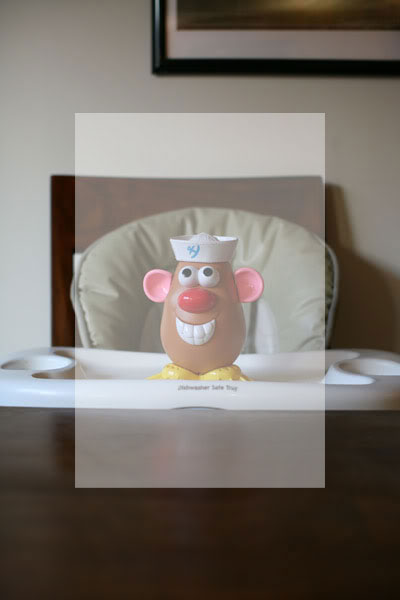
Still confused? Let’s try another angle (get the pun?) You just bought your very first Canon Rebel on the recommendation of all of your fellow photography enthusiasts. Those very same friends of yours encourage you to ditch the kit lens and go for the “thrify 50” – the 50mm 1.8 lens. It’s a great choice. Way to go. You slap that puppy onto your camera, look through the viewfinder, and WOAH… everything is super zoomed in, right? You can hardly shoot a picture of the person sitting across the dinner table from you without stepping a few feet backwards. You scratch your head, confused. “But I thought you said in your post on focal length that a 50mm lens replicated the angle of view of the human eye, this doesn’t seem right”. Well good for you for remembering that little nugget of information. And you’re right. So why do things seem so close through the viewfinder of your camera? Blame it on the field of view crop factor. Your camera’s sensor only captures around 62% of the image that the very same lens would capture on a full frame camera. This idea is usually shown by a set of concentric rectangles, the outermost one representing the “full frame” shot and the inner ones representing the crop. Let’s take a look, shall we?

The full image is what would have been captured with either a 35mm film camera or a full frame digital camera, in this case a 5d. The image was shot with a 50mm lens. The grayed out portion of the image is 62.5% of the image – or in other words approximately what would be captured with a crop frame camera. Big difference right? Now let’s see if this really pans out. Let’s take a look at the same shot (or as close to it as I could get to show you). I didn’t move myself or my lovely assistant (Mr. Potato) and only swapped the lens to another body, this time a crop frame sensor. Here’s the result.

Looks about the same as what’s in the box on the other image right? The framing is a little off, but this is just a demonstration and hey, I’m not perfect. You get the idea. So where does the 62% come from and what’s with the 1.5 or 1.6 crop? What do those numbers mean? Well someone out there came up with the idea of calling the sensor by the “field of view crop factor”, that is the value by which your “field of view” is multiplied when you use one of these sensors (I know, I know we’re getting complicated again).

Let me try to break it down. For the purpose of this explanation we’re going to pretend that “field of view” is the same thing as focal length… it’s not really but let’s just say it is. So you have your 50mm lens – that number, 50 is your focal length or field of view. And on a 1.6 crop sensor you need to multiply that number (50) by 1.6 to get the “effective” field of view (or focal length) of your lens. That is, what the focal length will appear to be. So your 50mm lens, times 1.6 crop, will have an effective focal length (or field of view more accurately) of 80mm. So basically, in essence, that 50mm lens you thought you bought is acting on your camera more like an 80mm lens, which is decidedly a telephoto length.

To explain it more in pictures here are a few more direct comparisons between the full and crop frame cameras. Here is a 28mm lens on a full frame

and on a crop frame. Note here that a 28mm on a 1.6 crop camera will give an effective field of view of 44.8, which is much closer to that 50 you were looking for in the first place. You can see that it is indeed a similar shot to the one taken with the 50mm on the full frame.

and just in case you need to see it one more time, here it is with an 85mm lens. Full frame first.

and the crop frame

So what does this all mean to you, the crop frame camera owner? Well it means you need to think carefully before you purchase your lenses. Realize that lenses designated as “wide angle” for a full frame camera might actually be more middle of the road, and lenses like the 50 will be telephoto. This is good news if you are a lover of telephoto photography and background compression. Not so great news if you are a lover of wide angle, because as I’m sure you’ve realized, you’d have to go REALLY wide to get a lens that is wide on your camera. The good news is that there are a few lenses out there (one of my favorites is the Tamron 17-50mm 2.8, which is available for a variety of camera bodies) that are made specifically for crop frame cameras and that will allow you get the wide angle you crave. The downfall of these lenses is that if you ever decide to upgrade to full frame, the lens will not be able to be used on your new body. A small price to pay for the ability to shoot wide angle on your Rebel, wouldn’t you say?

Crop frame cameras – why your field of view may not equal your focal length

well look at that! {photography}

I submitted one image into the Pioneer Woman’s newest photo contest earlier this week. The them is “green” and that was pretty much the only rule – it had to somehow (totally up to interpretation by the photographer) relate to the word or color or idea of green. I didn’t want to just dig through my archives and find a picture that had a lot of the color green in it, and I also didn’t want to shoot a plant or tree or forest or grass or anything else obviously green. Instead I sat and thought and dreamed up an idea and set it up and shot it. It was actually quite fun and rewarding. I should give myself challenges more often 🙂 I also should use my tripod more often. It normally sits in a corner gathering dust.

I just checked out her site earlier this morning to find out that I’ve been selected as one of the entries in group 4 – woohoo! There will be 5 groups total when it’s all said and done, which sounds like a lot but when you consider there were thousands of entries it’s still not too shabby. Plus I never ever ever win contests so it’s nice to just be recognized at all.

Here’s the photo.

green1

I’m pretty excited 🙂

well look at that! {photography}

Quick Tip of the Day: see the world from a new point of view

One of the easiest ways to improve your photos is to change the angle you’re taking them from. Most peoples’ first reaction to seeing something they want to take a picture of is to just snap away from right where they were whenever they noticed the photo op. It will do you good to take a few seconds (assuming you have a few seconds to spare… if it’s a split second once in a lifetime photo op go ahead and shoot from where you are) and look around to see if there’s a better angle you could be shooting from.

I see a lot of photos of babies shot from about parent height a few feet away from the kids and just pointed down… does this look familiar?

The picture’s not bad. The focus is fine and the exposure is fine as well. It’s just not that great. The angle has caused the baseboard to run straight through the baby’s head. Not good. And it’s kind of boring.

My two favorite options for changing up angles are to either get really high or really low. When you’re shooting adults getting up above them usually means standing on something. Kids on the other hand are easy. All you have to do is get closer and angle your camera down more. This one is from higher up… but it’s still not close enough. The baseboard is still going right through his head.

But if we get EVEN closer and up higher…

Ahh… much better. Way more fun and interesting.

Getting down low is just as good. This shot is pretty much exactly the same as the first but from kid-level. In my experience it’s not enough just to sit on the ground, the real magic happens when you get down on your belly and really exaggerate the angle. I never wear a skirt if I’m out shooting because I know I’m guaranteed to be lying on the ground at some point 🙂

One more shot with the low angle… in this one I shifted the camera down as low as possible to get the bright colors in the foreground. Still in the same location, so much more interesting!

See what a little shift in your point of view can do? 🙂

Quick Tip of the Day: see the world from a new point of view

Sunshine 101 – the basics of shooting outdoors

I get asked a lot what the secrets are to shooting nice portraits outdoors. I’m not going to lie, great outdoor lighting is a little harder to master than great indoor lighting. The sun is a tricky light source and a powerful one at that, so it can be a little overwhelming trying to figure it out. There are a lot of ways to tackle outdoor lighting including reflectors, diffusers and fill flash, but for now let’s just stick with the basics. You, your subject, your camera, and a patch of shade.

If all you’ve got are the items listed above, there are going to be three basic options for shooting. You can either face your subject into the sun, face your subject away from the sun, or put them in the shade. Most people’s gut reaction is to face their subject into the sun. Light is good right? Well not so fast. Remember how I said that the sun was a tricky light source? That’s because it’s extremely bright and it’s coming from overhead, meaning that it casts harsh shadows and on people those shadows tend to fall below the nose and eyes, giving a lovely raccoon look. I tend to find that one of the major culprits of outdoor photos looking amateur and “snapshotty” are the strong shadows below the eyes and nose. Check out this example. Shot at ISO 100, f2.8 and shutter speed 1/2500.

photography lessons on Permanent Riot by Katy Regnier photography

Definitely not my favorite. Now turn the subject around in the EXACT same spot so that the sun is behind and I find this to be a much more appealing shot. Taken at ISO 100, f2.8 shutter speed 1/1000

photography lessons on Permanent Riot by Katy Regnier photography

You’ll notice there are a few of what we call “hotspots” in this photo, areas that are somewhat overexposed when compared to the rest of the image. There are parts of her leg and blanket that are very very bright. But I’ll take those little hotspots over the first image any day. Remember if we had more equipment (diffuser, reflector, etc) we could take care of these problems but we’re just sticking to basics here. You should also know that if the sky had been visible in this shot it would have been “blown out” to white. It gives a sort of high key look that some people hate… I just happen to love it 🙂

The third option when the sun just isn’t doing it for you is the shade. This is by far the safest option and a good fallback. This one was shot in the shade at the same location, ISO 100, f2.8 and shutter speed 1/320

photography lessons on Permanent Riot by Katy Regnier photography

One part of shade shooting that most new photographers overlook is the quality of the shade. You want your subject to be out of the sun, but you also want for there to be natural light still hitting their faces. The best way to do this is to put the subject right at the edge of the shade, as close as possible to the sunlight without actually being in it. The difference in these next two is kind of subtle but to me it makes a big difference. The first is right at the edge of the shade, facing the direction of the sun. Notice they still have a bit of the sunkissed look even while being in the shade. ISO 100, f2.8, shutter speed 1/320

photography lessons on Permanent Riot by Katy Regnier photography

Even moving back a just a few feet will cause you to lose that “glow”. Same spot, just moved further into the shade. This time the shutter speed is 1/200

photography lessons on Permanent Riot by Katy Regnier photography

So there you go. Three different options for shooting in the sun, which you choose is up to you! One final warning note about shade shooting. While a park may seem like a great location for shooting portraits (lots of trees equals lots of shade right?) it’s actually hardly ever ideal. In my experience the shade from trees is almost always splotchy. Those little dots of light peeking through lead to what we call *dappled light* – great if you’re going to be painting a monet. Not so great if you’re shooting portraits. You’ll end up with those aforementioned “hotspots” right on your subject’s faces and nobody wants that.

Sunshine 101 – the basics of shooting outdoors

My dirty little secret – group shots

Have you ever attempted to take a great shot of 4 or more people (especially involving babies or children) and gotten frustrated at how SOMEONE always looks wretched in every single photo?  Finally get the kids to smile?  Then of course you are going to be blinking or looking the other way.  Well I have a dirty little secret I’m going to share with you and it might just save your family photos – it’s called compositing.

Whenever I take a group photo I’m like a crazy person with the shutter button, taking at least 10 frames of every grouping.  I do it at every wedding and portrait shoot that I photograph and I even do it with my own family.  Why you might ask?  Because if Uncle Bob or Grandpa Jim is blinking in that one photo that you would otherwise love… you can just grab his head from another shot and pop it right on there.  And no, I’m not joking.  It’s really not all that hard either and I’m going to walk you through it right now.

First up I have to say that for this to work out you need do a couple of things with your camera WHILE TAKING THE PHOTOS.  Photoshop works wonders but it will be much much easier to pull this off if you take a couple of seconds to prepare in advance.

Step one – Make sure you are shooting these photos in manual mode.  “Wait, help!” you cry… “I don’t know how to use manual mode!”  Never fear.  All you have to do is set your camera to the mode you normally use (say it’s aperture priority) and snap one test photo of your subjects exactly where you want them to be.  Then use the menu on your camera to bring up the little preview of the image.  There should be an option (on Canons it’s an info button) that allows you to see the settings that image was taken on.  Just set your camera to that and you are good to go.  The reason for shooting in manual is that if all of your images start out with the same exposure it will be MUCH easier to composite them together.  When shooting in any automatic mode your camera may change exposure between frames.

Step two – Make sure you don’t move between frames.  If you get closer or further or move side to side it will change your perspective and make the swapped head look “off” and fake.  Just try to stay in the same place and ask you subjects to remain in essentially the same place as well.  It helps if you shoot these frames in rapid succession.

Step three – You’ve got your images, now it’s time to move to photoshop, photoshop elements, or the editing program of your choice.  Yes, there are better ways of doing what I’m about to show you but this is the EASIEST and the one you’re most likely to be able to master with only a rudimentary knowledge or editing programs.  I used to do this for fun in high school so how hard can it be right?  Open up your program and pick out all your images you’d like to use.  For this demo I’m going to only use two images, you could use more if you have more people or want to swap more heads.  Here are my starting images, one with nice expressions on the babies and not the adults, and one the other way around.

Step four – One of your images needs to be your “goal image”.  This is the one that you like the best (other than that one pesky face that’s blinking or turned away).  We’ll come back to this one later but first open up the image that you would like to use the head from.  I’m choosing the image with the nice expression on the adults as my “goal image” because I feel like it will be easier to swap out the babies’ heads than it would be to swap out the adults.

Step five – Using the selection or lasso tool you’ll want to pick the head that you want to eventually replace the blinker or ugly face in your “goal photo”.  Draw a selection that includes not only the head but a little bit of the area surrounding it as well.  It doesn’t in any way have to be perfect, in fact it’s easier if it’s not so this can be a quick and dirty job.  Once you have the selection hit copy.  Then open up your goal image and paste in the new head.  If you followed my instructions on taking the pictures the heads should be similarly sized.  Here is my replacement head on the goal image.  Notice that when I hit paste it didn’t go to the right spot.  Don’t worry we’ll fix that next

Step six – The beauty of photoshop and photoshop elements is that they work with layers and you have the ability to adjust the opacity of layers.  This just means making the top layer slightly transparent to be able to see what’s under it.  This will help out with placing our head.  I generally start by lowering the opacity of the layer with the pasted face to about 50%

Step seven – With the opacity layerd you can now move the new face over the old one, it helps to line up things like the ears and eyes.  Here is the new face (still at 50% opacity) lined up over the old one.

Step eight – Once you’re all lined up turn back up the opacity to 100%.  You’ll see the new face on the goal image but the edges probably don’t line up perfectly and that’s a-ok. You’ll notice in my example that the neck and shoulders of the baby’s shirt don’t line up perfectly.

Step nine – This is where the magic happens 🙂 Take the eraser tool. In both photoshop and photoshop elements there are options for your eraser tool for the brush’s opacity. It will make your work a lot more believable if you lower the opacity to around 50% meaning that when you erase, it will only erase the image half way. This is important because when you erase at 100% opacity you’ll leave a hard line. If you erase twice at a 50% opacity the line will be much softer and you will hardly notice it at all. I like to use a fairly small brush and work around the edges inward in a few rounds of erasing. For this image I erased right up to the edges of the face and hair. I got rid of all of the parts where the shirt didn’t line up, and you can hardly see where the seam is. Here is the image with the new face.

All done – Once the new face was in place I decided I’d like to swap out the second baby’s face as well. I followed exactly the same steps as for the first face. Once I had all the faces swapped up I did a bit of retouching (that’s a whole different topic we’ll go into another day!) and adjustments to the image and voila – my final composite. So much better than either of the starting images and no one will ever know 😉 unless you tell them that is… but let’s just let it be our little secret!

Now that you know the secret all you need to do is promise me you won’t go photoshop crazy and swap heads on every one of your photos – this is obviously a last resort type fix… totally acceptable on large group shots or group shots with babies but you probably don’t want to hinge your career on the fact that if you screw it up you can always fix it later 😉 best to get it right in camera is always my motto… but if it doesn’t work out… well now you have one more tool in your toolbox!

My dirty little secret – group shots

The one snag with high ISO shooting

Hopefully you have read the first couple of posts giving a brief overview into exposure and the three elements that you need to control (aperture, shutter speed and ISO) if you haven’t yet read those you might want to go back and start there or this one might not make much sense 🙂

If you did read those other entries you’re probably thinking this whole exposure issue is a snap. With three variables to play with surely there will always be a way to get enough light? Right? The trouble is each of those variables has limits. So far we’ve learned about the limits of aperture (that your lens only opens up so wide) and shutter speed (slow down too much and your kids will become blurry messes). Now I’d like to introduce you to the one catch about raising your ISO. When you’ve reached the limits of each of the other two variables you will probably be tempted to bump up your ISO (which if you remember makes your camera more sensitive to light). What you might not be expecting is the one ugly side effect of high ISO digital shooting….

Moms… I would like to introduce you to digital noise.

You’ve probably noticed it but not known what it was. You might have even thought it was a problem with your camera. Those pesky speckles of icky looking grainy color. Yes. That is the one snag with high ISO shooting. You can’t get something for nothing and the tradeoff with shooting at high ISO is that you may get noise. How much noise depends on your camera and also how good your exposure was. The good news is that the better exposed your image was to begin with the less noise it will have. Yet another incentive for you to learn proper exposure 🙂 Newer cameras (and more expensive ones unfortunately) tend to have better noise control. It’s something that has been improved steadily over the last few years and hopefully will only continue to get better. There are cameras out there that will allow you to shoot up to ISO 6400 and still have acceptable noise levels. Now THAT is impressive!

So what does this mean to you? Should you keep your ISO low? Well that depends on how much the noise bothers you and what your alternatives are. If there is no way to change your f-stop or shutter speed and you don’t have any other light sources available (we’ll get into flashes in another post) then I say go for it! I’ll take a noisy photo over no photo any day. I would even take a noisy photo over a direct flash photo. There is also no harm in trying the high ISO shot AND the flash shot and comparing when you get home to see which you like better. My other tried and true favorite trick to getting your high ISO shots to look nice is black and white! We haven’t even gotten into the land of “post processing” your images but when we get there black and white will be one of the biggest issues to talk about. Converting your noisy shots to black and white will make them look more like vintagey film grain pictures and less like an accident 🙂

Here are a couple of shots just to illustrate what exactly “noise” is. This shot was taken at ISO 800 so the noise isn’t too terribly noticeable but it is there if you know what to look for. 50mm lens, f 2.8, 1/100th

photography lessons on permanent riot by Katy Regnier photography

You can see in this crop of the original image that there is some color noise (the splotches of red and green) in the hair and the image overall is not as “smooth” as it would be normally

photography lessons on permanent riot by Katy Regnier photography

Even though the noise in this shot is not terrible I would still probably prefer it in black and white

photography lessons on permanent riot by Katy Regnier photography

Lesson of the day? Noise is just one more consideration when deciding what settings to choose to get your perfect image. Does it mean high ISO shooting is out? No. Should you know about it? Yes. As if you didn’t already have enough variables to think about 😉

On a side note I have a lot of ideas for new topics, but I want to make sure that I cover the things that YOU want to know about. If you have a request you can either leave me a comment here or email me at mwac101@gmail.com I can’t wait to hear from you!

The one snag with high ISO shooting

Quick Tip of the Day : windows are your friend!

I know a few of you have left me feedback saying that the posts are great and informative, but a little bit overwhelming. I am trying to make sure I cover the basics, but I don’t want to bombard you with EVERYTHING you need to know all at once. That’s why I’ve decided to break it up a bit and save the super long posts for another day. Today will just be the first of many “quick tips” for when you don’t have time to really dive into the details of how your camera works.

Today’s quick tip is on window lighting. Unless you live in a house without windows (and I don’t believe you do) there is at least one great spot in your home to take pictures of your kids. What you want is a window that lets in lots of great bright light, but that hopefully doesn’t have direct sunlight pouring through it. Direct light can be a little bit harsh and hard to work with. What we’re looking for right now is a window that “glows”. If you have a porch or overhang the window below it is probably a good bet. If there isn’t a couch or rug or even clear space in that room near to the window you might want to do a little rearranging so that there is 🙂

The idea is that directional light (from the side) is much more dynamic and interesting than light from straight on. Set your subject so that the light hits one side of their face and shoot away. It will bring out all of that cute baby chub and give your picture way more pop than if you had the light right in front of them. There are a million and one ways to use light and use it to your advantage. This is just one of the easiest. Go try it out at home!

This one was shot with my 85mm lens at f1.8 1/500th of a second.

photography lessons on Permanent Riot by Katy Regnier photography

Quick Tip of the Day : windows are your friend!

Zoom or Prime – an intro to focal length (and why you should care about it)

One of the questions I get asked most is what camera and what lens to buy. I don’t like telling people what they should or shouldn’t get because equipment choices are BIG decisions with a lot of pros and cons to weigh. I think that a lot of people get tripped up with all of the options. They don’t know what the different lenses are good for and they don’t know which ones they need. I can’t tell you what lenses you need. Only you can decide that. What I can do is try to give you a little bit of insight into what the differences are between lenses and help you try to understand which ones you might like best.

So lets start at the beginning. There are two main kinds of lenses. Prime lenses (also known as fixed focal length lenses) and zoom lenses. Your camera kit lens was probably a zoom and probably had a range of somewhere around 18-55. That’s pretty standard. A focal length of around 50mm is said to be the most similar to the way that our eyes perceive the world. Anything from 21mm-35mm is commonly known as “wide angle”, anything from 35mm-70mm is said to be “normal”, and from 70-135 is “telephoto”. A lot of kit lenses try to give you everything in one lens, all the way from wide angle to telephoto. The drawback to these lenses is often that they suffer in their aperture capabilities, opening even less when you are zoomed in (remember I said that your kit lens probably doesn’t go any wider than 3.5, well if you zoom in to its longest focal length that number will probably change to 5.6!) They make lenses that zoom and have wide apertures but those are usually very expensive AND very big, bulky and heavy. Take Canon’s f2.8 24-70 lens. That bad boy is over $1000! It is easier to make lenses with wider apertures that are fixed or prime lenses, so you can usually find those with much more reasonable price tags. The trick is you might end up needing a whole camera bag full of lenses to add up to one zoom lens and there went your savings.

So which is the “right way” to shoot? Zoom or prime? It’s one of the most commonly debated topics in photography and you will find people on either side fiercely defending their position. But which do I use? Primes if you must know. One of the little “bonuses” of prime lenses is that they often give you just a little bit more sharpness and open up just a little wider than your zoom lens. I also prefer to “zoom with my feet” moving closer and further from my subject to get the look that I want.

One of the common misconceptions among new photographers about zoom lenses is that the point of them is that you don’t have to get closer to your subject to make it bigger in the frame. What these new photographers are failing to realize is that the focal length has a HUGE impact on the look of your image. To help illustrate this point here are 3 images of my son. All taken with his head filling approximately the same proportion of the image.

The first image was shot with a 24mm lens. See how animated it is? The wide angle shows tons of the background plus makes the play mat look fun and exciting and very 3 dimensional. I love photographing babies with wide angle lenses because of the sense of whimsy they lend to the shots.

photography lessons on Permanent Riot by Katy Regnier photography

Next up is the 50mm lens. I was further from the subject (to get him to fill the same amount of the frame) and you can see that the image has started to flatten out a bit.

photography lessons on Permanent Riot by Katy Regnier photography

Here it is again, this time with an 85mm lens. Telephoto lenses compress space, making everything appear closer together and flatter. See how much closer he appears to the china cabinet in the background compared to the first shot?

photography lessons on Permanent Riot by Katy Regnier photography

Just to give you an idea of the change in distance between me and my son during this series, here is the 24mm lens again at the same distance as the 85mm shot.

photography lessons on Permanent Riot by Katy Regnier photography

Each of these lenses has their place. You obviously couldn’t get close up shots of your kid’s soccer game with a wide angle lens, and you probably wouldn’t want to photograph your mother with one at a close range either (wide angles tend to exaggerate features, making people look “cartoonish”). There is no catch-all one perfect lens. It’s important to realize the difference that the focal length is going to have on your final image. If you are using a zoom lens it’s easy to fall into the trap of using your zoom to determine how much of the frame the subject is going to fill. I could have stood in one spot and taken both of the last two shots without even switching my lens. But what I would have missed by doing so is the fun and whimsical nature of the first shot, something I could only achieve by moving MYSELF closer and not by zooming. Take a second to play with your lenses (whether they be zoom or prime) and really notice the effect that a different lens has on the mood of your images. Only once you’ve really started to notice those differences can you start to decide which ones best fit your style.

Zoom or Prime – an intro to focal length (and why you should care about it)